Passkeys vs Passwords: What the Data Says
Passkeys vs passwords in numbers: sign-in success, speed and adoption from FIDO and Microsoft, how passkeys work, and which auth providers support them.
 Leonard Hußke••11 min read
On this page
On passkeys vs passwords, the published numbers all point the same way. Passkey sign-ins succeed more often, take a fraction of the time, and leave nothing on your server that an attacker can replay. If you build an app, offer passkeys now, next to passwords, and make them the default for returning users. Keep a password or email code as the fallback until most of your users have a passkey. 33 of the 37 auth providers in our directory support passkeys, so you rarely have to build WebAuthn yourself.
- A passkey is a key pair. Your server stores the public key. The private key stays on the user's device or in their password manager, and the user unlocks it with a fingerprint, face, or PIN.
- Passkey sign-ins succeed 93% of the time at the large consumer services in the FIDO Alliance's Passkey Index, against 78% for password plus MFA. Microsoft measured 98% for passkeys and 32% for passwords.
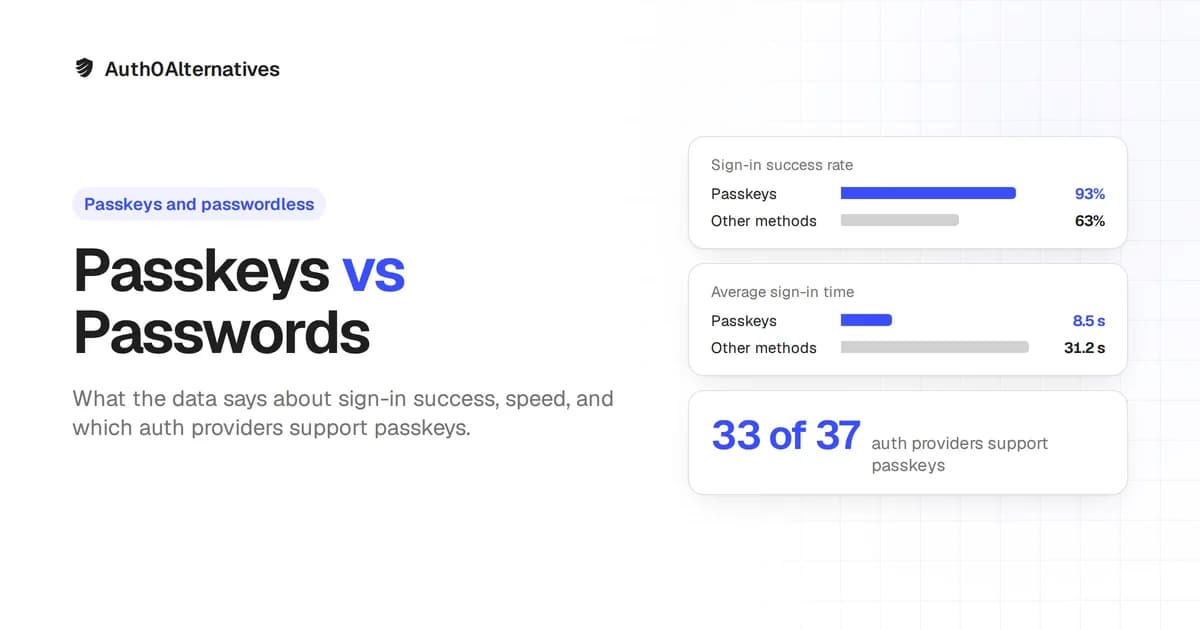
- Passkeys are faster. An average passkey sign-in took 8.5 seconds, against 31.2 seconds for email codes, SMS codes, and social login.
- 36% of successful sign-ins at those services now use a passkey, up from 26% a year earlier.
- 33 of 37 providers in our directory support passkeys. Supabase Auth has them as an experimental feature, and Firebase Authentication has none built in.
What is a passkey?
A passkey is a sign-in credential that replaces a password with a cryptographic key pair. The FIDO Alliance defines it as "an authentication credential based on FIDO standards". The browser side is WebAuthn, the W3C's Web Authentication API. Authenticators such as phones, laptops, and security keys speak FIDO's Client-to-Authenticator Protocol (CTAP).
When a user creates a passkey for your site, their device generates two keys. Your server keeps the public key. The private key never leaves the user's device or password manager. To sign in, the user unlocks the passkey the same way they unlock their phone, and the device proves it holds the private key.
Passkeys come in two kinds:
- Synced passkeys live in a password manager such as iCloud Keychain, Google Password Manager, 1Password, or Bitwarden. They follow the user to every device signed in to that account.
- Device-bound passkeys stay on one device, such as a YubiKey or Windows Hello on one laptop. They never leave it.
For a consumer app, accept both kinds. Only device-bound passkeys support attestation, so requiring attestation rules out synced passkeys. That matters for workforce and regulated use, which the section on limits covers below.
Passkeys vs passwords compared
| Password | Passkey | |
|---|---|---|
| What the user provides | A secret they remember or store | A fingerprint, face, or PIN that unlocks the device |
| What your server stores | A hash of the secret | A public key and a credential ID |
| What a database leak exposes | Hashes that attackers can crack offline | Public keys, which can't sign anything |
| Phishing | The user can type it on a fake site | The browser only uses it on the site that created it |
| Reuse across sites | Common | Impossible, each site gets its own key pair |
| Counts as MFA | No, it is one factor | Yes, with user verification, at Cognito, WorkOS, and Entra External ID |
| Works everywhere | Yes, any device and any form | Needs a WebAuthn browser and device, no embedded webviews |
| Recovery | Reset by email | Another device or the password manager, otherwise a fallback method |
| Standard | None | W3C WebAuthn and FIDO2 |
The difference that matters most is phishing. A password works wherever the user types it, including on a fake login page. A passkey is scoped to your domain, which WebAuthn calls the relying party ID. The browser refuses to use it anywhere else, so the user can't hand it to a phishing site even by mistake.
How do passkeys work?
Passkeys work through two WebAuthn ceremonies, registration and authentication. In both, your server sends a random challenge and the device answers with a signature.
Registration happens once per device or password manager. Your server sends a challenge and your domain name. The browser calls navigator.credentials.create(), the user unlocks their device, and the authenticator creates a new key pair for your domain. It returns the public key and a credential ID, and your server stores both with the user's account.
Sign-in works the same way in reverse. The browser calls navigator.credentials.get(), and the private key signs your challenge.
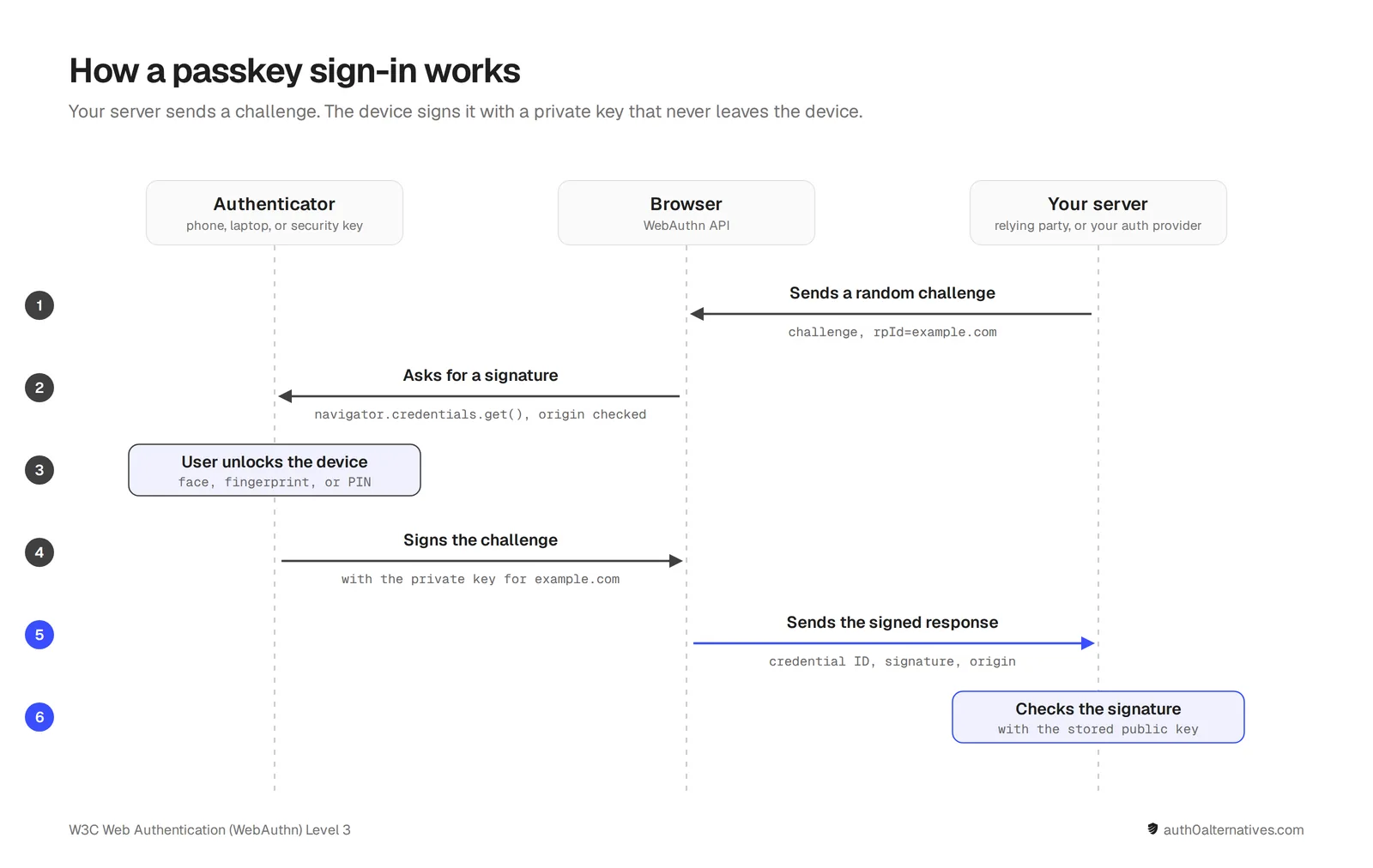
Three details explain most of what developers run into:
- The browser checks the domain, not the user. The WebAuthn Level 3 spec, a W3C Recommendation since August 2026, scopes each credential so that it "can only be accessed by origins belonging to that Relying Party". Pick your relying party ID before launch. Cognito's docs warn that if you change it, "your users must register again".
- The biometric never reaches your server. The device checks the fingerprint or face locally. Your server receives only the signed response.
- Cross-device sign-in uses a QR code. If the passkey is on a phone and the user is on a laptop, the browser shows a QR code. The phone scans it, and both devices need Bluetooth to prove they are close. WebAuthn calls this the hybrid transport.
If you use an auth provider, it runs the server side of both ceremonies for you. With a library such as Better Auth, you run it in your own app. Either way, the browser API is the same.
What the data says about passkeys vs passwords
The numbers below come from the companies that run passkeys at scale and from the FIDO Alliance, which pools their data. They are company-reported, so read them as what large consumer services measured on their own traffic, not as lab results.
Passkey sign-ins succeed more often
The FIDO Alliance's Passkey Index 2026 pools sign-in data from 15 large consumer services, including Google, Amazon, Microsoft, PayPal, and WhatsApp. Passkey sign-ins succeeded 93% of the time. Sign-ins with a password and traditional MFA succeeded 78% of the time. The first index, in 2025, compared passkeys with email codes, SMS codes, and social login and found 93% against 63%.
Sign-in success rate by method
Share of sign-in attempts that succeed at large consumer services. Classic MFA is a password plus a second factor. Other methods are email codes, SMS codes, and social login, measured in the first index
- Passkeys93%
- Classic MFA78%
- Other methods63%
Source: FIDO Alliance Passkey Index
Show data
| Success rate | |
|---|---|
| Passkeys | 93% |
| Classic MFA | 78% |
| Other methods | 63% |
Microsoft's own numbers show a bigger gap against passwords alone. In May 2025, Microsoft reported that about 98% of passkey sign-in attempts succeed, against 32% for passwords. Microsoft made new accounts "passwordless by default" at the same time.
Every failed sign-in is a user who retries, resets a password, or leaves. In FIDO's 2026 consumer survey of 11,000 people in ten countries, 47% said they are likely to abandon a purchase or a sign-in when they can't remember their password.
Passkeys take seconds, not half a minute
The first Passkey Index, from October 2025, timed sign-ins at nine companies: Amazon, Google, LY Corporation, Mercari, Microsoft, NTT DOCOMO, PayPal, Target, and TikTok.
Average sign-in time in seconds
Seconds per sign-in at nine large consumer services. Other methods are email codes, SMS codes, and social login
- Passkeys8.5
- Other methods31.2
Source: FIDO Alliance Passkey Index
Show data
| Seconds | |
|---|---|
| Passkeys | 8.5 |
| Other methods | 31.2 |
That is 73% less time per sign-in. The 2026 index found passkeys "nearly three times faster" than signing in without one, which saved users 27 seconds per sign-in on average. Microsoft measured passkey sign-ins as eight times faster than a password plus MFA. Amazon says a passkey sign-in is six times faster than a password.
Every source compared passkeys with a different method, so this table lists each figure with what it was measured against:
| Source | Compared with | Passkey success | Other method's success | Speed |
|---|---|---|---|---|
| Microsoft, May 2025 | Passwords | 98% | 32% | 8 times faster than password + MFA |
| Passkey Index 2025, 9 services | Email codes, SMS codes, social login | 93% | 63% | 8.5 s against 31.2 s |
| Passkey Index 2026, 15 services | Password + traditional MFA | 93% | 78% | Nearly 3 times faster, 27 s saved |
| Google, December 2024 | Passwords | 30% higher | Not given | 20% faster |
| Amazon, October 2026 | Passwords | Not given | Not given | 6 times faster |
A third of sign-ins at large services already use passkeys
36% of successful sign-ins at the services in the 2026 index used a passkey, up from 26% in 2025. The index grew from nine to 15 services in that year, so the increase shows a direction rather than an exact growth rate.
The individual numbers are large too:
- Amazon says more than 500 million customers have enabled passkeys on their accounts.
- Google reported 800 million Google accounts using passkeys in December 2024.
- Microsoft registered nearly a million new passkeys a day in May 2025.
- The FIDO Alliance estimates that 7 billion passkeys are in use worldwide.
Users know about passkeys. In FIDO's 2026 survey, 90% of consumers were aware of them and 75% had turned one on for at least one account. Whether your own users create one depends on whether you offer it at the right moment.
Fewer support tickets and SMS costs
The 2025 index found an 81% drop in login-related help-desk incidents after passkeys were adopted. In the 2026 index, every participant that provided savings data reported lower SMS one-time code costs. Every participant that measures phishing reported fewer successful attacks after deploying passkeys.
Passwords are still the main target
Microsoft's Digital Defense Report 2025 found that "more than 97% of identity attacks are password attacks". MFA blocks over 99% of them. If you keep passwords, which most apps will for years, pair them with MFA and a check against breached passwords.
For the full set of figures, see our authentication statistics.
Where passkeys still fall short
Passkeys win on the numbers, but four limits decide how you roll them out.
- Enrollment lags behind eligibility. In the 2025 index, 93% of accounts could use a passkey, but only 36% had one. Users have to create a passkey before they can use it, so prompt them after a successful sign-in instead of waiting for them to find a settings page.
- Many providers need an account first. Clerk says users "can only create passkeys after signing up". Cognito allows a passkey only after the user has signed in once. Entra External ID lets only email-and-password accounts register one. Expect a password, email code, or social login at sign-up for most providers.
- Recovery needs a fallback. A synced passkey survives a lost phone, because it is in the user's password manager. A device-bound passkey doesn't. Keep a second method, and let users register more than one passkey.
- Synced passkeys stop at AAL2. NIST SP 800-63B-4, final since July 2025, allows syncable authenticators at assurance level 2. It rules them out for level 3, because "syncing violates the non-exportability requirements of AAL3". If you sell to US federal agencies or regulated industries, you may need device-bound passkeys with attestation.
Two technical limits catch teams late. A passkey works only on its domain and that domain's subdomains, so separate domains for one product can't share passkeys without extra setup. Embedded webviews in mobile apps have limited or no WebAuthn support, so use the system browser or the platform's native passkey API.
33 of 37 auth providers support passkeys
Our directory tracks 55 features across 37 auth providers. 33 of them support passkeys. 14 of the 15 open-source providers do, and Supabase Auth is the exception with an experimental feature. 19 of the 22 managed services do.
The chart puts passkeys next to the password-related features from our listings.
Sign-in and password protection across 37 auth providers
Number of providers in the Auth0Alternatives directory that support each feature. Breach check means checking passwords against known data breaches
- Passwordless37
- MFA34
- Passkeys33
- Brute force27
- Breach check21
- Adaptive MFA18
Source: Auth0Alternatives listings
Show data
| Providers (of 37) | |
|---|---|
| Passwordless | 37 |
| MFA | 34 |
| Passkeys | 33 |
| Brute force | 27 |
| Breach check | 21 |
| Adaptive MFA | 18 |
More providers support passkeys than check passwords against breach lists. If you keep passwords as a fallback, check for breached password protection, because only 21 of the 37 offer it. The passkeys feature page lists every provider.
Support differs in the plan you need, whether users can sign up with a passkey, and whether you can use your own UI. This table shows a selection, checked against each provider's docs.
| Provider | Passkeys | Open source | Self-hosted | Notes |
|---|---|---|---|---|
| Auth0 | Yes | No | No | Database connections, offered at sign-up and through autofill |
| Clerk | Paid plans in production | No | No | Users add a passkey after they sign up |
| Descope | Yes | No | No | Sign up and sign in with a passkey in Flows |
| Stytch | Yes | No | No | Passkeys use the same WebAuthn endpoints |
| WorkOS | Yes | No | No | Hosted AuthKit UI only, no passkey API |
| Amazon Cognito | Essentials and Plus plans | No | No | Choice-based sign-in, passkey after the first sign-in |
| Kinde | Paid plans | No | No | Optional or mandatory, per organization |
| Entra External ID | Yes | No | No | Email and password accounts only, you build the passkey settings page |
| Hanko | Yes | Yes | Yes | Built around passkeys, with passwords and SSO as options |
| Keycloak | Yes | Yes | Yes | Supported since version 26.4, off by default |
| Better Auth | Yes | Yes | Yes | Passkey plugin built on SimpleWebAuthn |
| Ory | Yes | Yes | Yes | Dedicated passkey strategy with autofill |
| Supabase Auth | Experimental | Yes | Yes | Opt-in, and the API may change |
| Firebase Authentication | No | No | No | No built-in passkeys, only third-party extensions |
To compare two providers side by side, see Hanko vs Auth0, Clerk vs Auth0, or Supabase Auth vs Auth0. For more options, browse the open-source and self-hosted providers.
How to add passkeys to your app
- Pick a provider or library that supports passkeys. Check the plan you need and whether you can use your own UI, using the table above.
- Set the relying party ID to your main domain. Use the domain your users will keep, because changing it later invalidates every passkey.
- Offer a passkey right after sign-in or sign-up. Most providers need an existing session to register one. A prompt after a successful sign-in is where users create passkeys.
- Turn on autofill. WebAuthn's conditional UI shows saved passkeys in the username field, so returning users sign in with one tap. Auth0, Better Auth, Keycloak, and Ory support it.
- Keep a fallback and protect it. Keep the password or an email code, add MFA, and turn on breached password checks.
- Measure enrollment and success. Track the share of active users with a passkey and the share of sign-ins that use one. These are the same numbers the Passkey Index reports.
Passkeys answer the authentication question, which asks who the user is. What that user may do afterwards is authorization, which authentication vs authorization explains. If your customers are businesses, they may also want to sign in through their own identity provider. See SAML vs OIDC vs OAuth for that part.
FAQ
Yes. A passkey can't be guessed, reused on another site, or typed into a phishing page, because the browser uses it only on the domain that created it. A database leak exposes only public keys. Every participant in the 2026 Passkey Index that measures phishing reported fewer successful attacks after deploying passkeys.
The private key is much harder to steal than a password, because it never leaves the device or the password manager that stores it encrypted. The weak points are the account that syncs the passkey, the fallback method, and an unlocked device in the wrong hands. Protect the fallback with MFA.
A synced passkey is still in your password manager, such as iCloud Keychain or Google Password Manager, and works on your other devices. A device-bound passkey is gone with the device. For that case, apps keep a second sign-in method or let you register more than one passkey.
They can. A passkey combines something you have, the device, with something you are or know, the biometric or PIN. Amazon Cognito, WorkOS, and Entra External ID count a passkey with user verification as MFA. Auth0 asks for an MFA challenge after a passkey sign-in by default, and you can skip it with an Action.
Passkeys are built on them. FIDO2 is the FIDO Alliance's set of standards, made of the W3C's WebAuthn API for browsers and FIDO's CTAP protocol for authenticators. A passkey is a credential created through those standards. WebAuthn calls it a discoverable credential, and "synced passkeys" are its multi-device credentials.
Yes, and most apps do. Auth0's docs say passkeys "do not replace or invalidate a user's existing credentials". Offer passkeys as the faster option and keep the password as a fallback until most of your active users have a passkey.
Yes. A passkey synced in iCloud Keychain, Google Password Manager, 1Password, or Bitwarden works on every device signed in to that account. To use a passkey from a phone on a computer from another ecosystem, the computer shows a QR code that the phone scans.

 Descope
 Authsignal