Authentication vs Authorization: The Difference in Practice
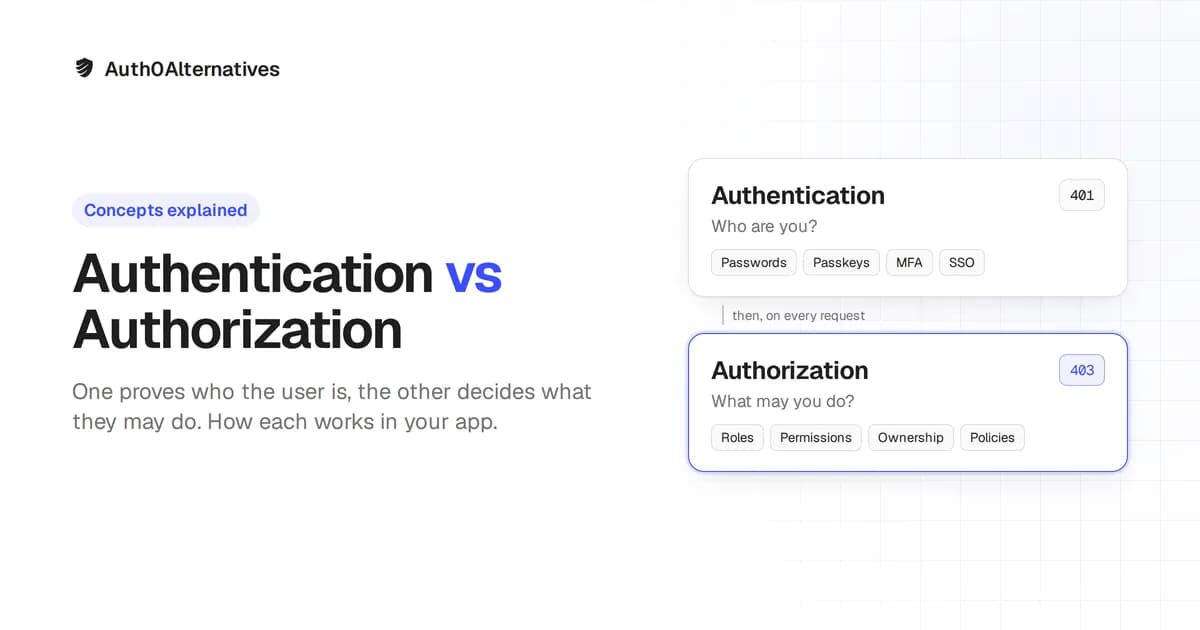
Authentication checks who a user is. Authorization decides what they may do. How each works in your app, 401 vs 403, and what auth providers handle.
 Leonard Hußke••11 min read
On this page
Authentication checks who a user is. Authorization decides what that user may do. Developers shorten them to AuthN and AuthZ. Authentication runs when someone signs in with a password, a passkey, or their company's SSO, and again when the session expires. Authorization runs on every request, when your app checks whether that user may read this invoice or delete that project. An auth provider handles most of the authentication for you. Authorization stays in your own code, and the provider gives you roles and permissions to check against.
- Authentication (AuthN) proves identity. Its result is a session or an ID token. When it fails, an API answers with
401 Unauthorized. - Authorization (AuthZ) allows or denies access to a resource. It reads roles, permissions, or relationships. When it fails, an API answers with
403 Forbidden. - Broken access control, a failure of authorization, is number 1 in the OWASP Top 10:2025. OWASP found some form of it in 100% of the applications it tested.
- All 37 providers in our directory handle sign-in. 31 also manage roles and permissions. The other 6 leave roles to your own database.
Authentication vs authorization compared
NIST defines authentication as "verifying the identity of a user, process, or device, often as a prerequisite to allowing access to resources". It defines authorization as "the process of granting or denying specific requests for obtaining and using information". Authentication comes first, and authorization uses its result.
| Authentication | Authorization | |
|---|---|---|
| Question | Who are you? | What may you do? |
| Short form | AuthN | AuthZ |
| When it runs | At sign-in, then when a session or token expires | On every request that touches a protected resource |
| Input | Something the user knows, has, or is, such as a password, a passkey, or a fingerprint | The user's identity plus roles, permissions, attributes, or relationships |
| Result | A session cookie or an ID token | Allow or deny |
| Visible to the user | Yes, as the sign-in screen | Mostly not, until a request is denied |
| Who changes it | The user, by changing a password or adding a passkey | An admin or your code, by changing roles and policies |
| Standards | OpenID Connect, SAML 2.0, WebAuthn | OAuth 2.0 scopes, and the RBAC, ABAC, and ReBAC models |
| HTTP error | 401 Unauthorized | 403 Forbidden |
| Who usually builds it | Your auth provider | You, with help from your auth provider |
Examples of authentication and authorization
Most actions in an app involve both checks. The table splits a few common ones.
| What happens | Authentication | Authorization |
|---|---|---|
| A user signs in to your SaaS app with Google | Google confirms who the user is and your app receives an ID token | Your app decides which workspaces the user can open |
| A user opens a teammate's document | The session cookie identifies the user | Your app checks whether the document is shared with the user |
| A mobile app calls your API | The API checks the access token's signature, issuer, and expiry | The API checks that the token's scopes allow this call |
| A support agent opens the admin panel | The agent signs in through the company's SSO | The support role may view orders but not issue refunds |
| A backend job calls another service | The job presents a client ID and secret and gets a token | The token's scopes limit the job to the endpoints it needs |
How authentication works
Authentication ends with your app knowing who is on the other side. The user proves their identity with one or more factors. NIST lists three kinds of factor: "something you know, something you have, and something you are". A password is something you know, a phone with an authenticator app is something you have, and a fingerprint is something you are. Your app, or your auth provider, checks the proof and then issues a session cookie or a token, so the user doesn't have to sign in again on every request.
These are the common sign-in methods, with the number of the 37 providers in our directory that support each:
- Passwordless login with magic links or one-time codes: 37 providers.
- Social login such as "Sign in with Google": 35 providers.
- Multi-factor authentication (MFA), which asks for a second factor after the first: 34 providers.
- Enterprise SSO through a customer's identity provider over SAML or OIDC: 34 providers.
- Passkeys, which replace the password with a key pair that the user's device or password manager keeps: 30 providers.
Authentication is hard to build well and easy to buy. Password hashing, brute-force limits, MFA enrollment, account recovery, and SAML signature checks are all security code that you would have to maintain. The MFA and passkeys feature pages list every provider that supports them. Passkeys vs passwords covers which sign-in method to offer.
How authorization works
Authorization starts after your app knows who the user is. For each request, your code asks one question: may this user do this action on this resource? The answer depends on the access model you choose.
- Role-based access control (RBAC) gives each user one or more roles, and each role a set of permissions. Auth0 defines RBAC as "an authorization strategy to assign permissions to users based on defined roles". An
editormay update posts, and aviewermay only read them. - Attribute-based access control (ABAC) decides with attributes of the user, the resource, and the context. One example is "managers may approve expenses under $5,000 from their own department".
- Relationship-based access control (ReBAC) decides with relationships between objects. "Anyone who can edit the folder can edit the documents in it" is a ReBAC rule. Google's permission system works this way. Google described it in the Zanzibar paper at USENIX ATC 2019 and wrote that Zanzibar "scales to trillions of access control lists and millions of authorization requests per second".
Most apps start with RBAC. B2B apps add roles per customer organization, so the same person can be an admin in one workspace and a viewer in another. Apps where users share documents or folders tend to outgrow roles and move to ReBAC. RBAC vs ABAC vs ReBAC compares the three models in detail.
Whatever the model, the check runs in your backend, close to the data. A TypeScript API handler that returns one invoice looks like this:
export async function getInvoice(req: Request, invoiceId: string) {
  // Authentication: who sent this request?
  const user = await verifyBearerToken(req.headers.get("authorization"))
  if (!user) {
    return new Response(null, { status: 401, headers: { "WWW-Authenticate": "Bearer" } })
  }

  // Authorization: may this user read this invoice?
  const invoice = await db.invoice.findUnique({ where: { id: invoiceId } })
  if (!invoice) return new Response(null, { status: 404 })
  if (invoice.customerId !== user.customerId) return new Response(null, { status: 403 })

  return Response.json(invoice)
}
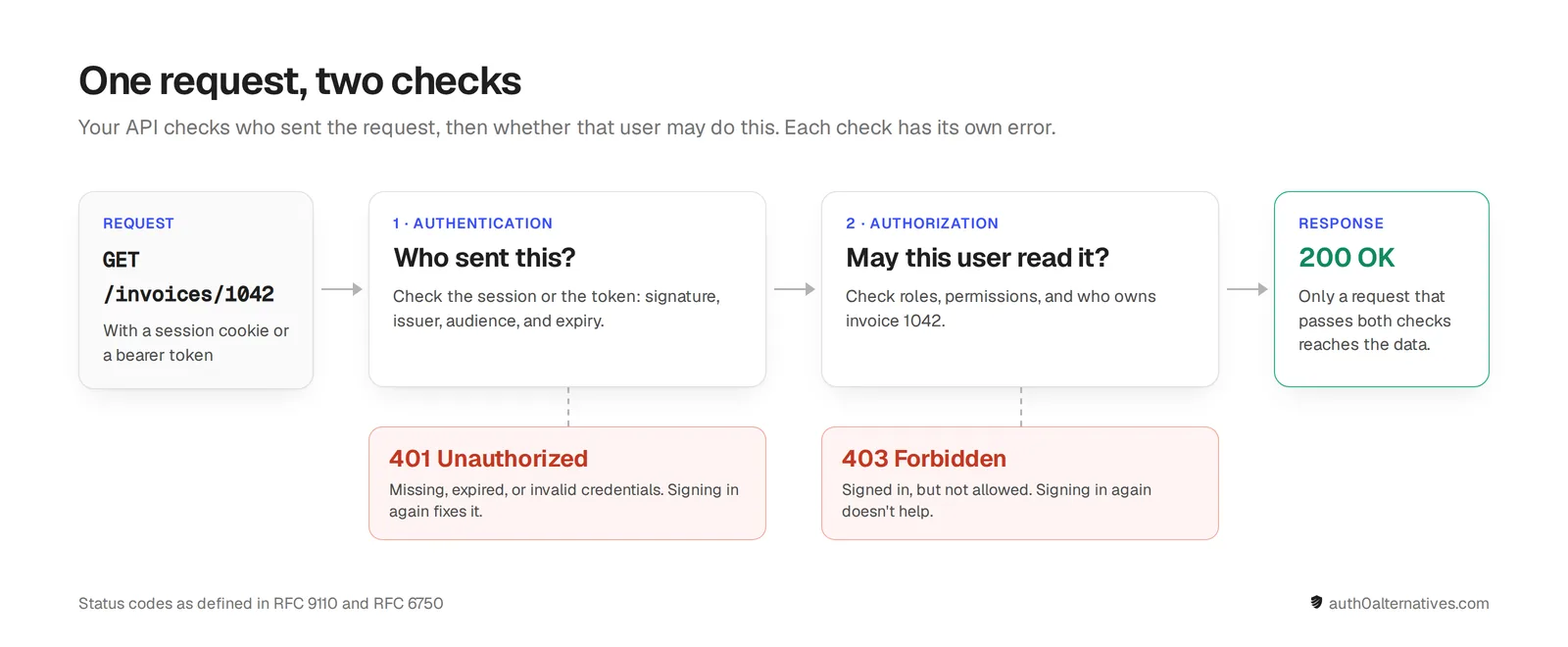
The first check is authentication. Your auth provider's SDK usually supplies a function such as verifyBearerToken. The second check is authorization, and only your code knows which customer the invoice belongs to.
401 vs 403: a 401 means not signed in, a 403 means not allowed
HTTP names the two failures badly. Status 401 is called "Unauthorized", but it means the server doesn't know who you are. RFC 9110, the HTTP standard, defines the two codes like this:
- 401 Unauthorized means "the request has not been applied because it lacks valid authentication credentials for the target resource". The server "MUST send a WWW-Authenticate header field" that tells the client how to authenticate.
- 403 Forbidden means "the server understood the request but refuses to fulfill it". If the request carried credentials, "the server considers them insufficient to grant access", and the client "SHOULD NOT automatically repeat the request with the same credentials".
The OAuth bearer token standard, RFC 6750, follows the same split. A token that is "expired, revoked, malformed, or invalid" gets a 401 with the error invalid_token. A valid token that lacks the needed scope gets a 403 with the error insufficient_scope.
Use 401 when signing in again would fix the problem. Use 403 when the user is signed in but isn't allowed. RFC 9110 also lets a server answer 404 instead of 403 to "hide" that a forbidden resource exists. That choice stops users from probing which invoice numbers exist.
ID tokens are for authentication, access tokens are for authorization
The two tokens that an OpenID Connect provider issues map to the two concepts:
- The ID token tells your app who signed in. The OpenID Connect spec calls it "a security token that contains Claims about the Authentication of an End-User". Your app reads it once, after sign-in.
- The access token tells an API what the caller may do. It carries scopes, and often roles or permissions. Auth0, for example, can "include all permissions assigned to the user in the
permissionsclaim of the access token". Your API reads it on every request.
Authorization bugs are more common than authentication bugs
The OWASP Top 10:2025 ranks broken access control first. OWASP says that "100% of the applications tested were found to have some form of broken access control". Authentication failures rank seventh, the same place as in 2021. The table shows OWASP's figures for the two categories.
| OWASP Top 10:2025 | A01 Broken access control | A07 Authentication failures |
|---|---|---|
| Rank | 1 | 7 |
| Weaknesses (CWEs) mapped | 40 | 36 |
| Total occurrences in OWASP's data | 1,839,701 | 1,120,673 |
| Published vulnerabilities (CVEs) mapped | 32,654 | 7,147 |
Broken access control has about 4.6 times as many CVEs as authentication failures. A likely reason is that most teams buy authentication from a provider and reuse its tested code. Authorization is custom code in every route, and one missing ownership check exposes another customer's data. A user who changes /invoices/1041 to /invoices/1042 in the URL and sees someone else's invoice has found an authorization bug, not an authentication bug.
Three habits prevent most of these bugs:
- Deny by default. A route without an explicit permission check should refuse the request.
- Check ownership on the server for every object. Hiding a button in the UI is not authorization.
- Keep the rules in one place, such as one policy function or one authorization service, so that every route asks the same question the same way.
What auth providers handle for each
Every auth provider handles authentication. For authorization, most give you the building blocks and leave the enforcement to you. The chart shows how many of the 37 providers in our directory support each feature.
What 37 auth providers handle
Number of providers in the Auth0Alternatives directory that support each feature, November 2026
- Passwordless login37
- Social login35
- MFA34
- Role management31
- Passkeys30
- Organizations29
- M2M tokens28
Source: Auth0Alternatives listings
Show data
| Providers (of 37) | |
|---|---|
| Passwordless login | 37 |
| Social login | 35 |
| MFA | 34 |
| Role management | 31 |
| Passkeys | 30 |
| Organizations | 29 |
| M2M tokens | 28 |
31 providers manage roles and permissions, so you can define an editor role in the provider's dashboard and read it from the token. Six don't: Auth.js, Authelia, Authsignal, Hanko, MagicLabs, and Sooauth. With those, you store roles in your own database. 29 providers support organizations, which B2B apps need for roles per customer. The role management page lists all 31.
For fine-grained rules, some vendors sell a separate authorization service:
- Auth0 FGA is a "fully hosted, managed service" for authorization models "from coarse-grained to fine-grained".
- WorkOS FGA "extends the existing WorkOS RBAC system" for B2B SaaS.
- Ory Keto calls itself "the first open-source implementation" of the Zanzibar design.
To run one yourself, OpenFGA is an open-source option. It "takes the best ideas from Google's Zanzibar paper" and is a CNCF incubating project.
The table shows how a selection of providers handle authorization, from our listings and the vendors' docs.
| Provider | Roles and permissions | Organizations | How it handles authorization | Open source |
|---|---|---|---|---|
| Auth0 | Yes | Yes | Roles and permissions in the access token. Auth0 FGA as a separate product | No |
| WorkOS | Yes | Yes | Roles and permissions on organization memberships. WorkOS FGA extends them | No |
| Ory | Yes | Yes | Ory Keto, a Zanzibar-style permission server | Yes |
| Authress | Yes | Yes | Role-based and resource-based access control | No |
| Logto | Yes | Yes | Global and organization roles, protection for API resources | Yes |
| Descope | Yes | Yes | Roles and permissions per tenant | No |
| Frontegg | Yes | Yes | Roles with permissions and hierarchy levels | No |
| PropelAuth | Yes | Yes | Custom roles and permissions, mapped from SAML | No |
| Supabase Auth | Yes | No | Postgres Row Level Security and custom claims in the access token | Yes |
| Amazon Cognito | Yes | No | Groups in the cognito:groups token claim, optionally mapped to AWS IAM roles | No |
| Auth.js | No | No | None. Authentication only | Yes |
Supabase is the odd one out. It moves authorization into the database. Supabase's docs say that Row Level Security "gives you granular authorization rules that run inside the database", and they tell you to "enable RLS on every table in an exposed schema".
Which one do you need?
You need both. Every app with accounts authenticates its users, and every app with private data authorizes each request. The real decision is how much of each you build yourself.
| Your app | Authentication | Authorization |
|---|---|---|
| A consumer app with one kind of user | An auth provider with passkeys and social login | Ownership checks in your own code |
| An internal tool or admin panel | SSO through your company's identity provider | A few roles from the provider |
| A B2B SaaS product | A provider with organizations and enterprise SSO, see B2B providers | Roles per organization, from the provider |
| An app where users share documents and folders | Any provider | A ReBAC service such as OpenFGA or Ory Keto |
| An app built on Supabase | Supabase Auth | Row Level Security policies in Postgres |
For B2B products, compare WorkOS vs Auth0 and Clerk vs WorkOS. For a self-hosted stack, Ory vs Keycloak covers two open-source providers that ship both authentication and role management. If you build on Postgres, see Supabase Auth vs Auth0. If Okta is on your shortlist, Auth0 vs Okta explains which of its products is for your customers and which is for your employees.
FAQ
Authentication. Your app can only decide what a user may do once it knows who the user is. Public pages make an authorization decision too, with an anonymous visitor as the identity.
AuthN is short for authentication and AuthZ is short for authorization. Developers use the short forms because both words start with "auth".
OAuth 2.0 is an authorization framework. It gives an app an access token to call an API. OpenID Connect adds authentication on top of OAuth and returns an ID token that says who signed in.
Single sign-on is authentication. It lets a user sign in once with their company's identity provider and reach many apps. The identity provider can also send groups or roles, which each app then uses for its own authorization.
MFA is authentication. It asks for a second factor, such as a passkey or a one-time code, to prove identity more strongly. Some apps ask for MFA again before a risky action, such as a payment. That pattern is called step-up authentication, and your authorization rules decide when to require it.
Both, depending on the token. A JSON Web Token (JWT) is only a format. An OpenID Connect ID token is a JWT that proves who signed in. Many providers also issue access tokens as JWTs, and those carry scopes and permissions for authorization.
401 Unauthorized means the server doesn't know who you are, because the credentials are missing or invalid. 403 Forbidden means the server knows who you are, but you aren't allowed to do this. Signing in again can fix a 401. Signing in again doesn't fix a 403.
Partly. 31 of the 37 providers we list manage roles and permissions and put them in tokens. Your backend still has to check those roles on each request and check who owns each object. For complex sharing rules, use a dedicated service such as Auth0 FGA, WorkOS FGA, OpenFGA, or Ory Keto.

 Descope
 Authsignal